
12 September 2026
How to Set Up DawnOne as a Sunrise Alarm Clock
By OpenClip
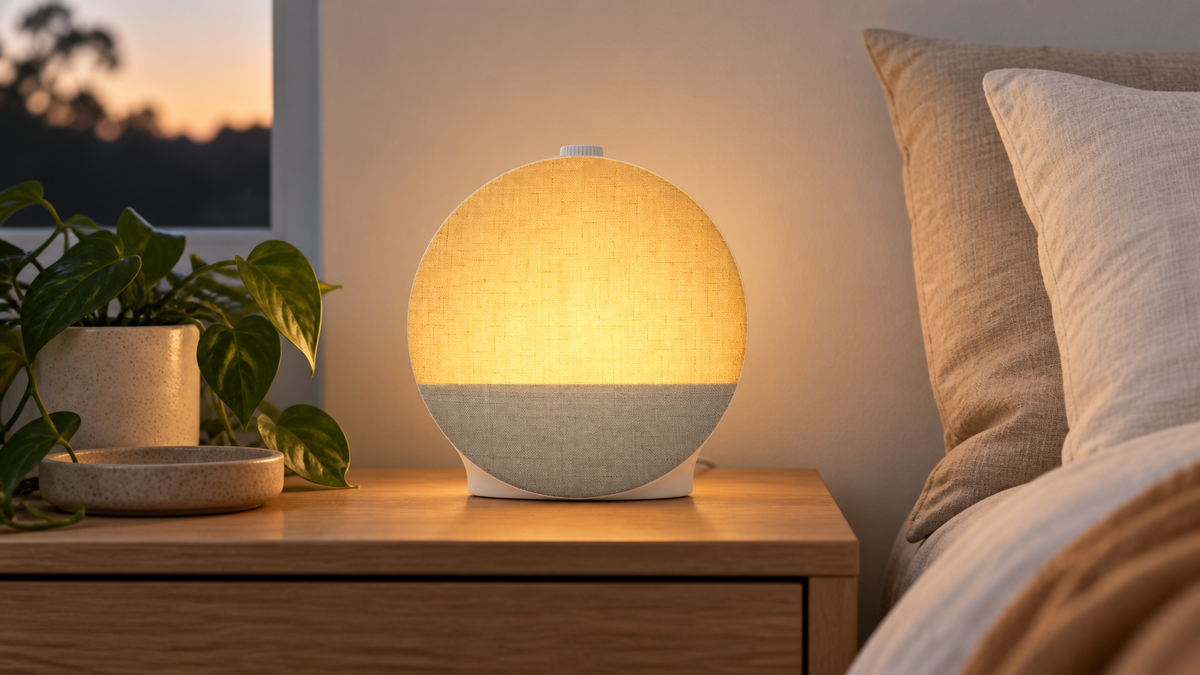
Set up DawnOne by placing it where you can see and reach it, connecting USB-C power, setting the correct clock and alarm time, then choosing a 10–60 minute sunrise window and light, sound or both. Run a daytime test before relying on it in the morning, and adjust the brightness, sound and position to suit your room rather than copying someone else’s settings.
What DawnOne can be set to do
DawnOne™ Sunrise Alarm Clock combines a wake-up light, digital alarm, built-in audio and Bluetooth playback in a compact 15cm white unit. Its sunrise light can begin 10, 20, 30, 40, 50 or 60 minutes before the alarm. You can choose light only, sound only, or light and sound together.
The current product information lists seven alarm sounds, 30 built-in sounds for the wider sound function, 12 light colours and Bluetooth audio. Those choices make the device flexible, but the easiest first setup is deliberately simple: one alarm, one sunrise duration and one wake method that you test before bedtime.
Choose the bedside position first
Start with a stable surface where the 15cm clock fits without sitting on the edge. The front should be visible from your normal sleeping position, and the top control dial should remain easy to reach. Avoid crowding the device between a water glass, stacked books, curtains or loose bedding.
Position matters because the light needs a clear path into the room. Turning the illuminated front towards a wall may create a softer reflected effect, while facing it towards the bed makes the display and light more direct. Neither is automatically correct; test both during the day and choose the arrangement that is practical in your space.
Connect the USB-C power as directed in the supplied instructions. Route the cable behind the bedside table where possible, without stretching it across a walkway or pinching it beneath furniture. Keep the connection dry and accessible.
Set the clock before the alarm
An alarm routine depends on the base time being correct. Use the controls on the device to set the clock, then check whether the display matches the time format and current local time you intend to use. If daylight-saving time changes in your state or territory, review the clock instead of assuming it updated automatically.
Once the clock is correct, set the alarm time. The product’s current setup flow uses the top-mounted controls: press and hold the alarm control to enter alarm settings, then use the top dial to move through the available choices. Confirm each setting as directed by the product instructions.
Work backwards to choose a sunrise duration
The sunrise window is the period before the alarm when the light begins. DawnOne offers 10, 20, 30, 40, 50 and 60 minutes. It also allows a zero setting when you want light and sound to start together.
Choose the window by working backwards from your alarm time. For example, a 6:30am alarm with a 30-minute sunrise setting begins the light sequence at 6:00am. That calculation helps you notice whether the light will start while another person is still sleeping or before you actually want the room illuminated.
Longer is not automatically better. Begin with a middle option, test it, and adjust in 10-minute steps. The goal is a repeatable timing choice that fits your household schedule—not an unsupported promise about sleep quality or how you should feel on waking.
Choose light, sound or both
Light only
Choose the light-only option when you want the sunrise sequence without an alarm sound. In the device settings, this means selecting the appropriate light timing and turning the alarm sound off. Test the full sequence before relying on it, especially if you must wake at a fixed time.
Sound only
Select sound only when you want a conventional audible alarm without an earlier light sequence. DawnOne allows the sunrise setting to be set to zero or disabled for this purpose. Choose from the available alarm sounds and set the volume at a level you have tested in your actual room.
Light and sound together
This option begins the light before the alarm according to your chosen window, then adds the selected alarm sound at the set time. It is the most complete use of the sunrise alarm function, but it still needs a trial run to confirm timing, visibility and volume.
Run a daytime test before the first night
Set a temporary alarm for 10 or 20 minutes ahead while you are awake. Watch what happens from the position where you will normally use the clock. Confirm:
- the displayed time and alarm time are correct
- the sunrise starts when your chosen interval says it should
- the light is visible without being blocked by objects
- the selected alarm sound plays, if enabled
- the volume is suitable for the room
- the controls are reachable without moving the device
After the test, restore the real alarm time and confirm that the alarm is active. This short rehearsal catches setup mistakes when they are easy to correct.
Keep evening audio separate from the alarm
DawnOne also offers 30 built-in sounds, 12 light colours and Bluetooth audio. Treat these as separate evening or ambient features rather than changing your alarm every night. A stable wake setup is easier to check when the alarm time, sunrise window and alarm sound stay consistent.
Bluetooth lets you connect a compatible phone for your own audio. Pair and test the connection while awake, and remember that Bluetooth playback is not the same setting as the seven alarm sounds. Do not assume a streamed track or phone connection will replace the configured alarm.
If you are also arranging the room visually, the guide to styling a paper table lamp in a small room explains scale, empty space and cable routing for a separate ambient lamp. For broader product browsing, visit the Home & Family collection.
A weekly DawnOne check
Review the settings whenever your schedule changes. Check the clock after daylight-saving transitions, confirm the alarm is enabled after weekends or travel, and make sure the power cable has not been displaced during cleaning. Keep the fabric front free from items that block the light or display.
DawnOne is an alarm and lighting device, not a medical or therapeutic product. If you have specific sleep, hearing, vision or health needs, choose an alarm approach based on appropriate professional advice rather than relying on general product guidance.
Frequently asked questions
How long before the alarm can the sunrise begin?
You can choose 10, 20, 30, 40, 50 or 60 minutes before the alarm. Select zero when you want the light and sound to begin together.
Can DawnOne wake me with light but no sound?
Yes. Configure the sunrise timing and turn the alarm sound off. Run a daytime test before relying on light only for a fixed wake time.
Can I use sound without the sunrise light?
Yes. Set the sunrise setting to zero or off and select one of the seven alarm sounds at your preferred tested volume.
How many sounds and light colours are included?
The current product information lists 30 built-in sounds, including a separate choice of seven alarm sounds, plus 12 light colours. Alarm sounds and general audio functions should be configured separately.
Can DawnOne play audio from my phone?
Yes. DawnOne supports Bluetooth audio for a compatible phone. Test pairing and playback separately; do not treat a Bluetooth connection as a substitute for the configured alarm.
Build the routine one setting at a time
Start with a clear bedside position, correct clock, one alarm time and a tested sunrise window. Once that works, explore sound and colour options without losing track of the core alarm. See the current specifications and available configuration on the DawnOne product page.