
26 October 2026
How to Prepare a Portrait Photo for a Custom Kinusaiga Pattern
By OpenClip
Choose a clear expression, leave room around the subject and simplify the background before submitting a portrait for custom Kinusaiga interpretation.
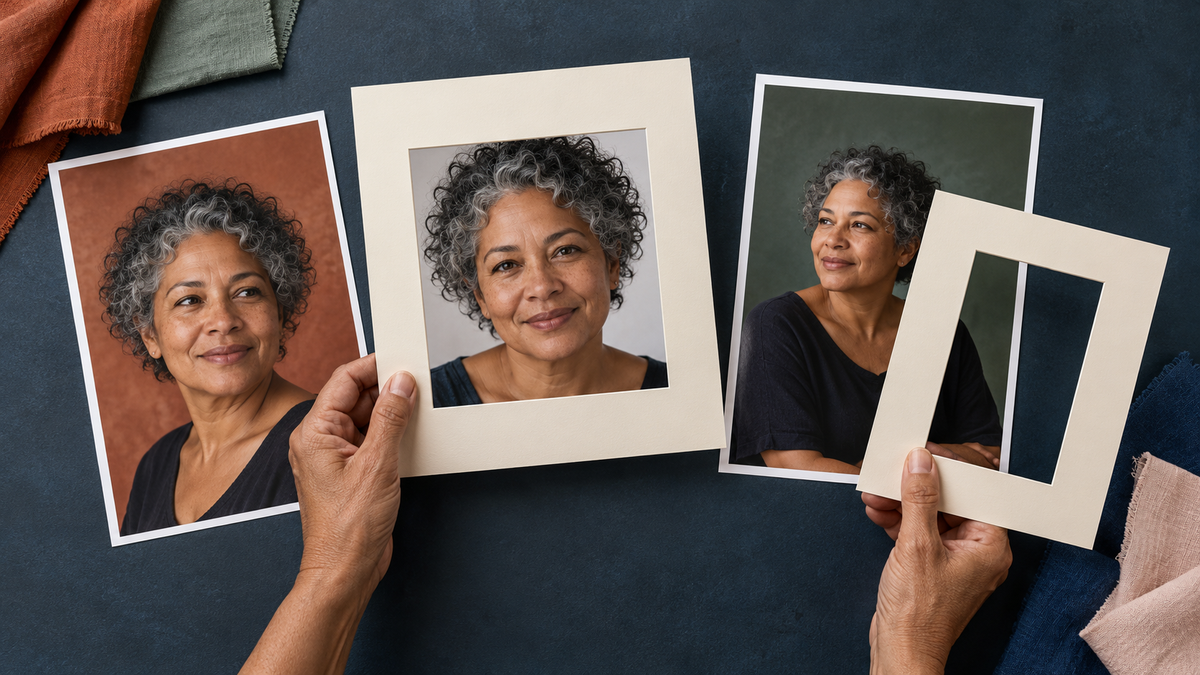
A strong portrait for a custom Kinusaiga pattern has one clear subject, a simple outline and enough detail to recognise the person without relying on a busy background. Choose an image with even light, visible facial features and a little space around the head and shoulders. Decide what can be simplified before you submit the photo.
Start with the expression, not the scenery
For a portrait keepsake, the face carries the story. Look first for an expression that feels characteristic of the person: the way they smile, turn towards the camera or hold their gaze. A technically perfect photograph can still feel impersonal if the expression does not seem like them.
Choose a frame in which the eyes, nose, mouth and hairline are visible. Soft side light or open shade usually preserves more facial detail than strong overhead sun. Avoid images where a deep shadow crosses one eye, bright glare removes part of the face or a heavy filter changes skin tone.
Choose a crop that gives the portrait room
A head-and-shoulders or upper-body crop is often easier to interpret than a distant full-length figure surrounded by scenery. The subject should be large enough to read clearly, but not so tightly cropped that hair, shoulders or meaningful clothing details are cut away.
Leave a modest margin around the person. That space gives the design room to simplify the outer shape and balance the composition. If the original photo includes several people, decide whether the custom pattern is meant to feature one portrait or a group; do not assume that every face can remain equally detailed at a smaller scale.
If you are comparing several candidates, our broader guide to choosing a photo for a custom Kinusaiga pattern covers clarity, contrast and subject selection across pets, places and people.
Simplify the background before it competes
Portrait backgrounds work best when they support the silhouette rather than breaking it into many small shapes. A plain wall, soft garden blur, open sky or broad area of one colour is easier to translate than shelves, patterned curtains, crowds or fine foliage crossing the face and hair.
You do not need to edit the background out yourself. Instead, explain which elements matter. You might ask to keep the chair because it is part of the memory, retain one flowering branch, or remove unrelated people and signage. Clear priorities are more useful than asking for every detail to remain.
Pay special attention to edges. Dark hair against a dark room, a cream shirt against a pale wall or a patterned sleeve against patterned furniture can make the outline harder to separate. Another photo with clearer contrast may preserve the person more faithfully.
Decide which details make the person recognisable
Not every photographic detail needs to become a separate fabric area. Choose two or three features that feel essential: a distinctive curl pattern, glasses, a favourite scarf, the shape of a collar or a particular colour worn often.
Very fine jewellery, tiny prints, loose flyaway hairs and complex lace may need to be simplified. Simplification is not the same as making the portrait generic. It is a way to keep the strongest shapes readable when the image is interpreted as fabric art.
Check the file before you upload it
- The subject is in focus at normal viewing size.
- The face is not hidden by sunglasses, hands, hair or heavy shadow unless that feature is intentionally part of the portrait.
- The image is the original file or a high-quality copy, not a small screenshot.
- The crop leaves some space around the head and shoulders.
- You have permission to use the photograph.
- Your notes identify what must stay and what may be simplified or removed.
Ready to prepare your portrait? OpenClip’s custom Kinusaiga photo page lets you upload the image and add design notes. The Custom digital PDF is currently A$9.99 per design, is emailed within 1–3 business days, and contains digital files only. Fabrics, foam, tools and other physical materials are not included.
Write design notes that answer real choices
Useful notes are short and specific. Name the person or relationship only if it helps you organise the request; do not include unnecessary private information. Then describe the visual priorities.
For example:
- Keep the person from the waist up and centre the face.
- Retain the silver curls and deep green scarf.
- Simplify the garden to two broad background colours.
- Remove the sign and the person at the far edge.
- Use the second photo only as a reference for the jacket colour.
Avoid asking for a finished artwork if you are choosing the digital service. The A$9.99 option is a custom digital PDF pattern, not a completed portrait, physical kit or materials bundle. You print and use the files for your own making process, with materials and tools purchased separately.
Use a second photo only when it clarifies something
A supporting photo can help when the main portrait has the right expression but hides an important detail. A second image might show the full hairstyle, the colour of a jacket or the shape of glasses more clearly.
It should not introduce a different pose, season, outfit and lighting unless your notes explain which version to follow. One strong main image plus one purposeful reference is usually clearer than a large folder of near-duplicates.
Frequently asked questions
Can I use a selfie for a custom Kinusaiga portrait?
Yes, if the selfie is sharp, evenly lit and not distorted by a very close wide-angle view. A little distance from the camera usually gives the face more natural proportions.
Should I remove the background first?
No. Upload the clearest original and use your notes to identify what should remain, be simplified or be removed. Heavy automatic background removal can erase hair and clothing edges.
What does the A$9.99 digital service include?
The current offer is a custom digital PDF with a numbered outline, colour layout and suggested fabric palette, reviewed before email delivery. It includes no physical materials, tools or finished artwork.
How long does the digital PDF take?
The current public page states that the made-to-order PDF is emailed within 1–3 business days. Check the live page again if you need it for a particular date.
A clear portrait begins with clear priorities
The best source image is not always the newest or most polished one. It is the photograph that shows the person clearly and gives you confidence about what matters: expression, silhouette, colour and one or two recognisable details. Choose that image, simplify the rest in your notes and leave room for the portrait to become its own fabric interpretation.